


In 2026, anonymous crypto wallets that don’t require ID or verification are in higher demand than ever. With growing concerns about privacy and data collection, many users now prefer wallets that let them manage digital assets without disclosing personal information.
We’ll review the best anonymous crypto wallets you may choose from based on your needs.
Top anonymous crypto wallets
- Best Wallet: The top choice for anonymity and privacy, including a wallet that offers decentralized exchange.
- Bitamp: Lightweight Bitcoin-only wallet offering complete anonymity and security. Available on Tor.
- Ledger Flex: An offline cold storage anonymous crypto wallet that stands out for its robust safety features.
- Trezor Model One: An affordable, anonymous hardware wallet offering high security.
- Trezor Model T: Touchscreen wallet with Shamir Backup and Tor support.
- Cypherock X1: A hardware wallet that uses a 2-of-5 card system to split private keys.
- Ledger Stax: Curved E-Ink display with Bluetooth and wireless charging, designed for easy viewing.
- ELLIPAL Titan 2.0: Fully offline device that confirms transactions by scanning QR codes.
- Blockstream Jade: Works with Bitcoin and the Liquid network sidechain, connecting by USB, Bluetooth, or QR.
- Coldcard Mk4: Bitcoin-only wallet that signs transactions from a microSD card and offers hidden wallets.
- BitBox02: Small USB-C wallet with open-source firmware and microSD backups.
- SafePal S1: Covers more than 200 blockchains and signs transactions with QR codes.
- Keystone 3 Pro: A touchscreen device that stays offline and supports several backup methods for recovery.
- Exodus Wallet: A versatile anonymous crypto wallet with a browser extension and a desktop wallet.
- Wasabi Wallet: A desktop wallet that routes traffic through Tor and mixes coins.
- NGRAVE ZERO: Offline device with fingerprint unlock and metal plates to keep backups safe.
What is an anonymous crypto wallet?
Most anonymous crypto wallets let you store, send, and receive cryptocurrencies without linking them to your real identity. These wallets protect your privacy by utilizing encryption, granting you complete control over your wallet.
Some privacy-focused wallets utilize Tor and other encryption methods to enhance security. Some anonymous wallets are free to use, while others may incur a fee. USB wallets often have prices that vary from model to model.
A closer look at the best anonymous crypto wallets in 2026
Here is a more detailed look at the top anonymous cryptocurrency wallets, highlighting their unique features, benefits, and security measures.
1. Best Wallet – The Best anonymous crypto wallet for all-around privacy and utility
Best Wallet is designed for new users who appreciate privacy and flexibility. This best anonymous crypto wallet, which doesn’t hold users’ funds, offers access to digital assets across over 60 blockchains.
To ensure security, it features biometric login, multi-factor authentication, and encrypted PIN protection for everyday use.

Its built-in decentralized exchange (DEX) allows users to swap tokens directly within the app without relying on third-party services.
With an interface optimized to be used as a mobile app, the wallet is user-friendly. However, it currently lacks support for desktop wallets and browser platforms, which may be a drawback for users.
Furthermore, while providing anonymity, the crypto wallet may incur transaction fees during times of network congestion.
- Supported cryptos: 1,000+
- Supported blockchains: 60+
- Type of wallet: Software (hot wallet)
Pros of Best Wallet
- Stay anonymous with no KYC, ideal for privacy-focused users
- Swap tokens in-app without third-party exchanges
- Supports Bitcoin and 1,000+ assets on 60+ blockchains
- Strong security with 2FA, biometrics, encryption, and PIN protection
- Beginner-friendly interface
Cons of Best Wallet
- Mobile-only, no desktop version
- Fees may spike during network congestion
| To get a complete look at how it delivers both privacy and functionality across 50+ blockchains, take a moment to read the full Best Wallet review. |
2. Bitamp – Best anonymous Bitcoin-only wallet that’s also available on Tor
Bitamp is a top privacy-first BTC wallet with a streamlined browser interface. Its client-side encryption enables users to retain complete control of their private keys when connecting to the Bitcoin network.
From wallet generation to platform access, Bitamp does not require any email addresses or personal information. The anonymous platform is also open source, which increases the wallet’s trustworthiness among Bitcoin enthusiasts.
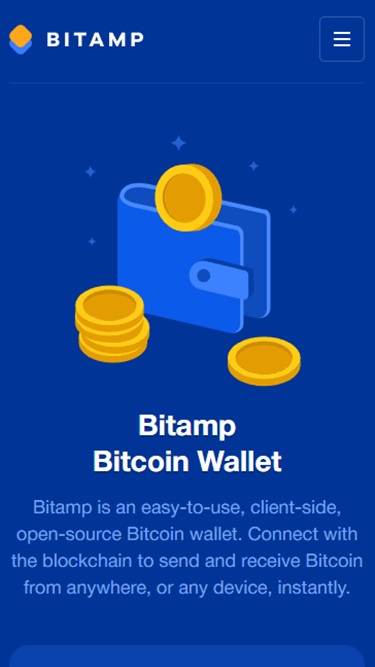
Users can create an account by either securely generating a unique Bitamp seed phrase or a BTC wallet private key. Bitamp also supports seed phrases from Electrum, Trezor, Ledger, and more, allowing users to access Bitcoin holdings stored in other wallets without leaving the platform.
Additionally, the client-side wallet offers over 450 receiving BTC addresses, comprising Legacy, SegWit-compatible, and SegWit-native formats. This builds an additional layer of privacy protection and reduces traceability.
Regarding Bitamp’s user experience, the platform’s browser-based design offers a sleek, streamlined interface for sending and receiving BTC. To send Bitcoin, users can enter a wallet address, scan a QR code, or paste a BitPay link.
While Bitamp has yet to support the Lightning Network, its interface suggests this feature is in development. Alongside this, the platform aims to integrate an exchange in the future.
You can access Bitamp on Tor through its official onion address: “bitampgt5htkfk5ek6bnzzwgr2iuvoeqgy2fofqib2yx7yegnqzgmsid.onion“
Bitamp key takeaways: coins, fees, security & more
- Supported cryptos: Bitcoin only
- Supported blockchains: 1
- Type of wallet: Software (client-side hot wallet)
Pros of Bitamp
- Privacy-focused Bitcoin wallet with client-side encryption
- No-KYC wallet setup and access
- Get 450+ receiving addresses for greater anonymity
- Supports seed phrases from Electrum, Mycelium, Blockchain, Trezor, Ledger, and more
- Free to use, open-source platform
Cons of Bitamp
- Only supports Bitcoin
- Limited customer support
3. Ledger Flex – Best air-gapped hardware wallet for long-term cold storage
Ledger Flex stands out in the hardware wallet market by offering a combination of robust security and a user-friendly design.
It provides Bitcoin storage, keeping users’ funds offline and protected. Ledger Flex is a flexible choice for popular assets and niche tokens, supporting thousands of cryptocurrencies across various blockchains.
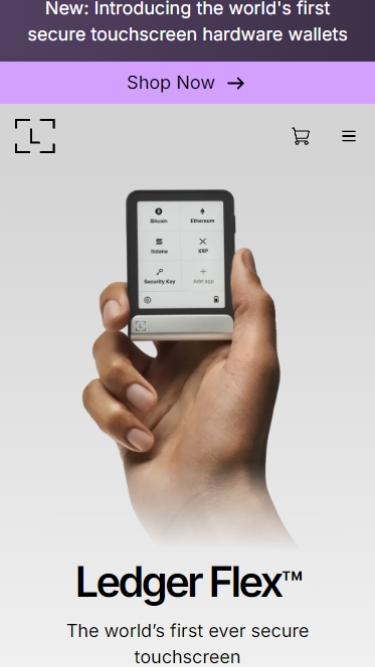
Its integration with the Ledger Live app adds functionality, allowing users to manage, purchase, and exchange cryptocurrencies within a secure environment.
The wallet is equipped with a secure element chip that meets CC EAL5+ standards, ensuring protection against attacks and enabling users to sign transactions offline with confidence.
Moreover, Bluetooth connectivity allows access without compromising enhanced security, unlike many third-party wallets that require constant online connection. Ledger Flex stands out because it allows you to keep your private keys completely offline, minimizing hacking risks.
While Ledger Flex is an option for long-term storage, it may not be as convenient for traders due to its setup process compared to software wallets.
However, for individuals seeking a reliable way to store Bitcoin, Ledger Flex is a top choice, especially for those prioritizing Ledger hardware wallets and looking to store seed phrases securely for added protection.
Ledger Flex key takeaways: coins, fees, security & more
- Supported cryptos: 5,500+
- Supported blockchains: 10+
- Type of wallet: Hardware
Pros of Ledger Flex
- Cold storage keeps funds offline and secure
- Supports 5,500+ cryptocurrencies for broad portfolio management
- Works with Ledger Live for easy tracking
- Bluetooth connectivity for on-the-go access without USB
- Certified secure chip for enhanced long-term security
Cons of Ledger Flex
- Setup can be slow for frequent traders
- More expensive than software wallet options
| Anyone considering cold storage for long-term privacy should take a look at the Ledger Flex review, which explains how it balances offline security with everyday usability. |
4. Trezor Model One – Best affordable Bitcoin wallet without Bluetooth
The Trezor Model One is often regarded as a Bitcoin-only wallet, although it supports over 1,800 cryptocurrencies. This hardware wallet offers a budget-friendly option for individuals seeking to safeguard their cryptocurrencies without incurring significant expenses.
Unlike more advanced models, such as Ledger Nano, the Model One lacks a touchscreen and features like Shamir Backup. However, it still ensures robust protection by keeping keys offline.
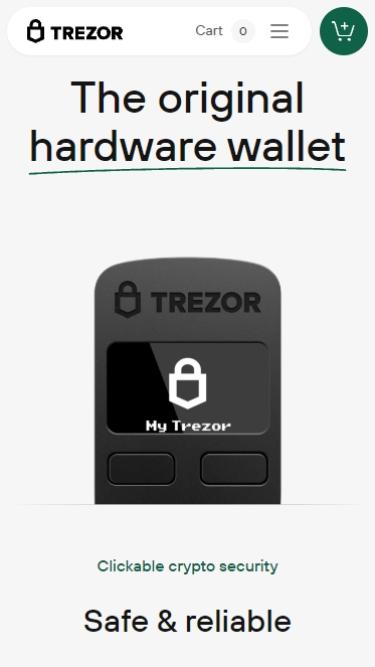
This anonymous Bitcoin wallet also offers biometric authentication through PIN protection, a recovery seed, and compatibility with third-party applications, such as MetaMask.
For those looking to store Bitcoin securely without investing in high-end hardware, the Trezor Model One is an excellent choice.
However, if you frequently interact with DeFi platforms or require support from a wallet provider that integrates with advanced Web3 tools or NFTs, this model may not be the most suitable option.
| For a deeper comparison, you can check out the Ledger Nano vs. Trezor guide to see how these wallets stack up. |
Trezor Model One key takeaways: coins, fees, security & more
- Supported cryptos: 1,800+
- Supported blockchains: 10+
- Type of wallet: Hardware
Pros of Trezor Model One
- Affordable, beginner-friendly cold storage option
- Supports 1,800+ cryptocurrencies, including major assets
- Offline key storage for strong security
- Works with third-party apps like MetaMask for flexibility
- Open-source firmware for transparency and community auditing
Cons of Trezor Model One
- Missing advanced features like touchscreen or Shamir Backup
- No support for NFTs or DeFi applications
| If you’re leaning toward an affordable cold storage option that still puts privacy first, the Trezor wallet review breaks down everything you need to know. |
5. Trezor Model T – Best Tor-enabled hardware wallet
The Trezor Model T goes beyond standard hardware wallets by offering enhanced recovery flexibility and stronger privacy options.
Instead of relying solely on a single recovery phrase, users can secure funds with SLIP-39 Shamir Backup, splitting the recovery into multiple shares stored in different locations.
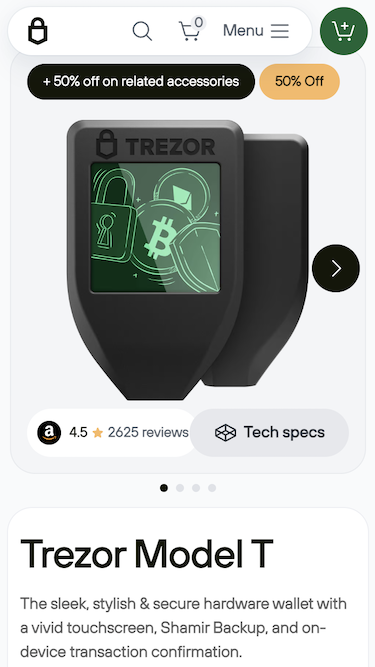
This makes it much harder for attackers to compromise a wallet while still allowing safe recovery if one part is lost.
On the privacy side, Trezor Suite includes coin control, allowing users to select which coins are spent in each transaction, and Tor support, which masks network traffic.
Combined with USB-only connectivity that avoids wireless risks, Model T is a strong fit for anyone building a larger crypto portfolio who wants control, privacy, and resilience in one device.
- Supported cryptos: 1,800+
- Supported blockchains: 10+
- Type of wallet: Hardware
Pros of Trezor Model T
- Large color touchscreen that makes approvals clear and reduces mistakes
- Open-source firmware for transparent security
- SLIP-39 Shamir Backup to split recovery into shares
- Tor routing and coin control in Suite to improve transaction privacy
- USB-only connectivity that avoids wireless radios
Cons of Trezor Model T
- Higher price than entry-level hardware wallets
- No Bluetooth for mobile-first workflows
6. Cypherock X1 – Best seedless anonymous wallet for recovery without a seed phrase
Cypherock X1 takes a significantly different approach to securing crypto by eliminating the single recovery phrase that most wallets rely on. Instead, it splits the private key into five separate parts: one stored on the vault itself and four on individual NFC cards.
To access funds, you only need two parts, which makes it possible to recover assets even if one card is lost.
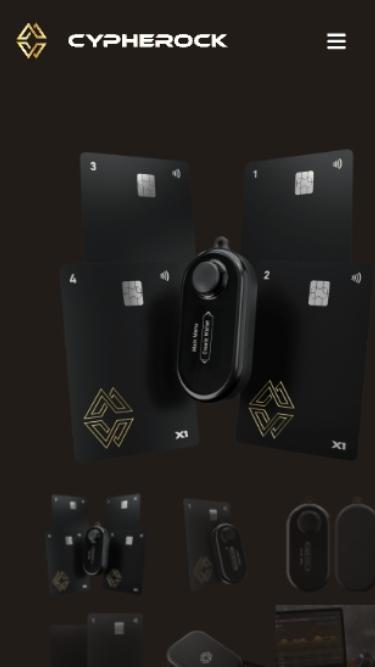
This design is especially useful for people worried about physical theft or accidents. Cards can be stored in separate locations, shared with family members, or used as part of an inheritance plan.
Because the vault only requires USB power and lacks Bluetooth or Wi-Fi, it also mitigates remote attack risks. The combination of these features makes Cypherock X1 a solid choice for long-term holders who want a balance between security and resilience.
- Supported cryptos: 9,000+
- Supported blockchains: 10+
- Type of wallet: Hardware
Pros of Cypherock X1
- Seedless recovery removes single-point risks
- Flexible recovery with 2-of-5 card threshold
- No wireless connectivity reduces online exposure
- Supports 9,000+ assets across major blockchains
- Can import and manage multiple seeds in one device
Cons of Cypherock X1
- Managing cards takes extra planning and care
- Limited mobile convenience compared to app-first wallets
7. Ledger Stax – Best Bluetooth hardware wallet for managing crypto wirelessly
Ledger Stax is a premium hardware wallet designed for people who want private storage while keeping the flexibility to manage assets anywhere.
Your keys remain offline at all times, while transactions are confirmed on a curved E-Ink touchscreen that is sharp, paper-like, and visible in any light.
It pairs with Ledger Live, allowing you to track balances and sign transfers over Bluetooth, eliminating the need for cables when switching between devices. For those who prefer a wired session, USB-C is available.
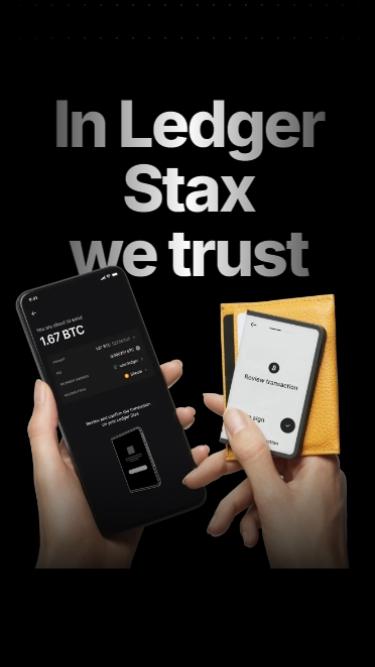
Charging is also simple thanks to Qi support, the same wireless charging technology used in modern smartphones, which means you can drop it on a pad without hunting for cords.
Security is handled by a certified secure element, a tamper-resistant chip built to protect secrets even under physical attack. For recovery, the widely recognized BIP-39 standard is used, which allows funds to be restored in the event of device loss through a 24-word phrase.
Together, these protections give Stax both mobility and resilience, making it a solid fit for users who value privacy and control on the go.
- Supported cryptos: 5,500+
- Supported blockchains: 10+
- Type of wallet: Hardware
Pros of Ledger Stax
- Manage assets wirelessly with Bluetooth while keeping keys offline
- Large E-Ink display makes every transaction review clear and reliable
- Supports 5,500+ cryptocurrencies, perfect for diverse portfolios
- Integrates with Ledger Live for easy tracking and management
- Convenient charging through both USB-C and Qi wireless pads
Cons of Ledger Stax
- Costs more than simpler hardware wallets, making it less accessible for beginners
- Bulkier design that may not suit those looking for a pocket-sized option
8. ELLIPAL Titan 2.0 – Best fully air-gapped crypto wallet with QR signing
ELLIPAL Titan 2.0 takes a different path from most hardware wallets by remaining completely disconnected from networks. There is no Bluetooth, Wi-Fi, or even USB data connection, which means hackers never get a remote entry point to your keys.
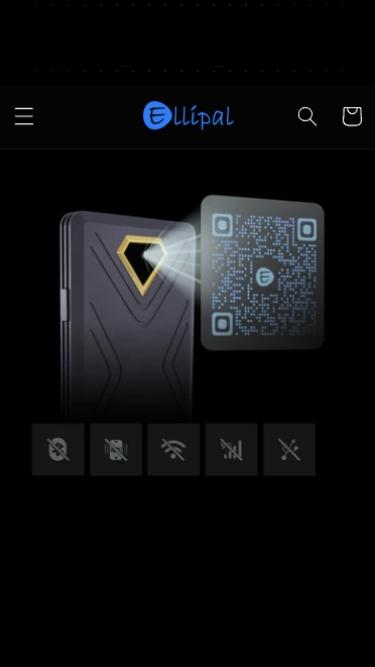
Instead of cables, it uses QR codes for transactions. You prepare the transfer on the mobile app, scan it with the Titan’s camera, and then confirm on the large 4-inch touchscreen.
The device itself is built like a vault. Its solid metal case is sealed to resist tampering, and it’s designed to be both dustproof and water-resistant. Updates are loaded through an SD card, which keeps the process offline and straightforward.
All of this makes Titan 2.0 a strong fit for anyone who wants maximum separation from the internet while still maintaining practical daily use.
ELLIPAL Titan 2.0 key takeaways: coins, fees, security & more
- Supported cryptos: 10,000+
- Supported blockchains: 40+
- Type of wallet: Hardware
Pros of ELLIPAL Titan 2.0
- Air-gapped design keeps keys offline and away from networks
- QR signing gives a clear, visual approval for each step
- Rugged metal body adds tamper resistance and durability
- Supports 10,000+ assets across 40+ networks for broad coverage
- SD card firmware updates keep maintenance simple and offline
Cons of ELLIPAL Titan 2.0
- Larger and heavier than slim hardware wallets
- QR scanning can be slower than a wired click-to-sign flow
9. Blockstream Jade – Best Bitcoin-only wallet with Tor & Liquid support
Blockstream Jade is designed for Bitcoin holders who also want the option to use the Liquid Network, a Bitcoin sidechain that enables faster transfers and confidential transactions.
With Jade, your keys always stay offline, and you approve each step directly on the device. You can connect over USB, pair with Bluetooth, or stay fully air-gapped by using QR codes, which gives you the freedom to balance convenience with security.
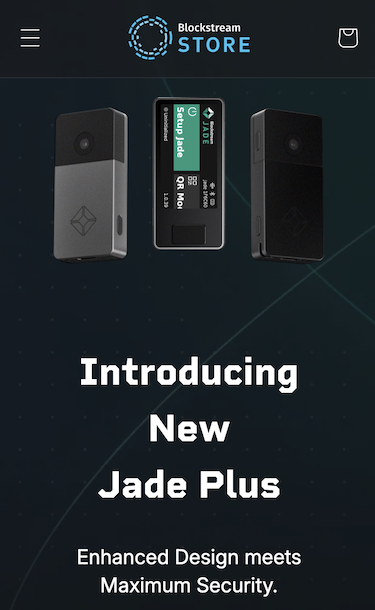
Instead of a traditional secure element, Jade uses a virtual model that encrypts keys and ties access to PIN verification. The Jade Plus version takes it a step further with a built-in camera for QR code signing and even offline firmware updates.
The color display clearly shows transaction details before you approve, while recovery is performed using a standard BIP-39 seed and optional passphrases for hidden accounts.
If you want a wallet that fits both Bitcoin cold storage and Liquid’s privacy-focused transfers, Jade delivers security and flexibility in one device.
Blockstream Jade key takeaways: coins, fees, security & more
- Supported cryptos: Bitcoin + Liquid network’s compatible assets
- Supported blockchains: 2
- Type of wallet: Hardware
Pros of Blockstream Jade
- Choose USB, Bluetooth, or QR signing depending on your security needs
- Supports both Bitcoin and Liquid, giving you faster and more private transfer options
- Open-source design makes both hardware and firmware verifiable by the community
- Anti-Exfil signing and authenticity checks add safeguards during transactions
- Multisig compatibility helps build resilient long-term storage setups
Cons of Blockstream Jade
- Limited to Bitcoin and Liquid, with no support for altcoins or tokens
- QR-based workflows may feel slower for first-time users
10. Coldcard Mk4 – Most secure Bitcoin-only cold wallet fully air-gapped
Coldcard Mk4 is designed for individuals who wish to store Bitcoin with the strongest possible protection against online risks. By focusing exclusively on Bitcoin, it avoids the extra code and vulnerabilities that often come with multi-asset wallets, keeping the device specialized and straightforward.
Every step of the process is kept offline. You create a transaction on compatible software such as Sparrow or Electrum, save it to a microSD card, and then load it into the Coldcard for signing.
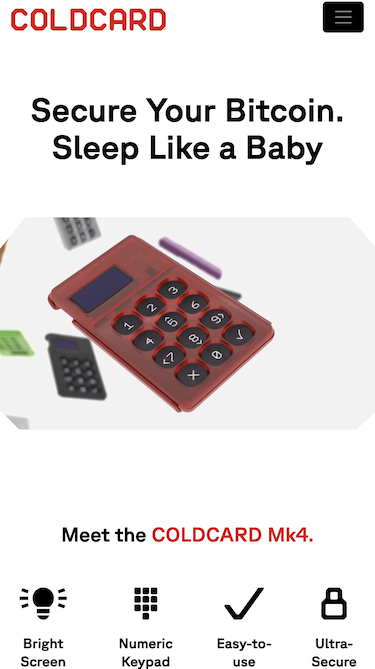
Once approved, the signed file is returned to the computer for broadcast. This way, the private keys remain locked inside the device at all times.
Its physical design also reinforces trust. The case is transparent, so you can check for interference, while a sliding cover shields the keypad and screen when not in use.
For added security, you can create hidden wallets with passphrases or utilize special PIN modes that trigger different behaviors if the device is forced to unlock. Recovery is performed with a standard 12/24-word seed, providing you with complete control in the event of loss.
Coldcard Mk4 key takeaways: coins, fees, security & more
- Supported cryptos: Bitcoin only
- Supported blockchains: 1
- Type of wallet: Hardware
Pros of Coldcard Mk4
- Keeps Bitcoin keys offline at all times through microSD-based signing
- Offers hidden wallets and duress PINs for protection under pressure
- Supports complex and multisig transactions without performance issues
- Tamper-evident design and sliding cover increase physical trust
- Open-source firmware and verifiable updates enhance transparency
Cons of Coldcard Mk4
- Bitcoin-only focus means no altcoins or token storage
- Technical workflow can feel advanced for beginners
11. BitBox02 – Best compact open-source hardware wallet with microSD backup
BitBox02 is a compact hardware wallet with a clean, minimal design that focuses on security you can verify.
Keys are protected by a dual-chip setup with a dedicated secure chip, and the firmware is open-source, allowing you to review its functionality instead of relying on marketing claims.
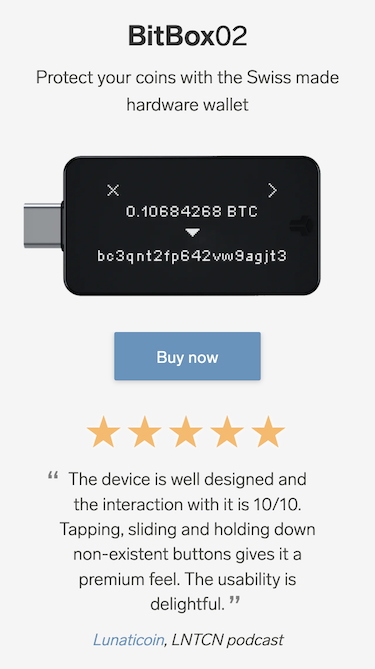
Backups are quick. You can create an instant microSD backup in seconds, and then add a standard BIP-39 seed as a second layer for redundancy.
The small OLED screen displays transaction details, and capacitive touch sensors replace buttons, creating a tidy and pocketable device.
It connects over USB-C and works on Windows, macOS, Linux, and Android. For tokens and DeFi, you can use third-party wallets through WalletConnect and similar tools, which keep the device flexible without adding bloat.
BitBox02 key takeaways: coins, fees, security & more
- Supported cryptos: 1,500+
- Supported blockchains: 10+
- Type of wallet: Hardware
Pros of BitBox02
- Instant microSD backups make recovery planning fast and simple
- Open-source firmware and audits improve trust and transparency
- Secure chip and anti-klepto protect signatures and private keys
- USB-C plus Android support fit everyday use without extra dongles
- Works with third-party wallets for ERC-20 and DeFi when needed
Cons of BitBox02
- Small monochrome screen can make long address checks slower
- Standard model lacks direct iOS support unless you opt for Nova
Which anonymous cryptocurrency wallet is right for you?
When selecting an anonymous cryptocurrency wallet, it’s essential to consider several key factors. Some wallets offer full privacy for basic functions but may require identity verification for fiat conversions or large withdrawals, for example.
Here are some points to consider:
- Level of privacy required: Consider the level of anonymity you need. Certain wallets offer privacy without any KYC requirements, while others may request verification for functions such as cash withdrawals.
- Ease of use: Wallets are designed to suit user comfort. Novices may lean towards an anonymous wallet with an interface, while experienced users might prefer a hardware wallet for added security.
- Supported cryptocurrencies: When selecting a cryptocurrency wallet, it’s essential to verify the supported coins to ensure they are suitable for a diverse portfolio.
- Security features: Look for wallets that prioritize security features, such as two-factor authentication (2FA), encryption, and cold storage. Hardware wallets often provide this level of protection.
- Cost considerations: Software wallets are free, while hardware wallets come at a price. Evaluate your budget if you require security for significant assets.
Are anonymous crypto wallets legal?
Recently, governments have strengthened oversight to combat money laundering and other illicit activity through frameworks such as FinCEN in the United States and MiCA (Markets in Crypto-Assets) in the European Union.
While anonymous wallets are generally legal in most jurisdictions, new regulations may be introduced over time. Using crypto mixers, however, to anonymize your transactions (where the cryptos are sent to or from) is different from just holding your cryptocurrencies in an anonymous wallet.
Conclusion
For me, the Best Wallet mobile app and browser extension are the best anonymous wallets overall, and not just because they have no KYC requirements. This wallet supports over 1,000 cryptocurrencies and features key benefits, including a built-in DEX for private swaps. Plus, it’s easy to use, making it a great choice for both beginners and experienced users.
Some will prefer using both software and hardware wallets that offer extensive crypto support, which helps maximize flexibility and privacy.

How We Rate Cryptocurrency Wallets
We manually review the cryptocurrency wallets on our list. Below are the key metrics we check before cryptocurrency wallets on the website. For further details, you can also take a look at our crypto wallets rating guide, featured on ValueWalk.